Introducing Shareable Playlists in SignageFlow
At SignageFlow, one of our goals is simple: make digital signage easier to manage, easier to review, and easier to roll out across teams.
That is why we are excited to introduce Shareable Playlists.
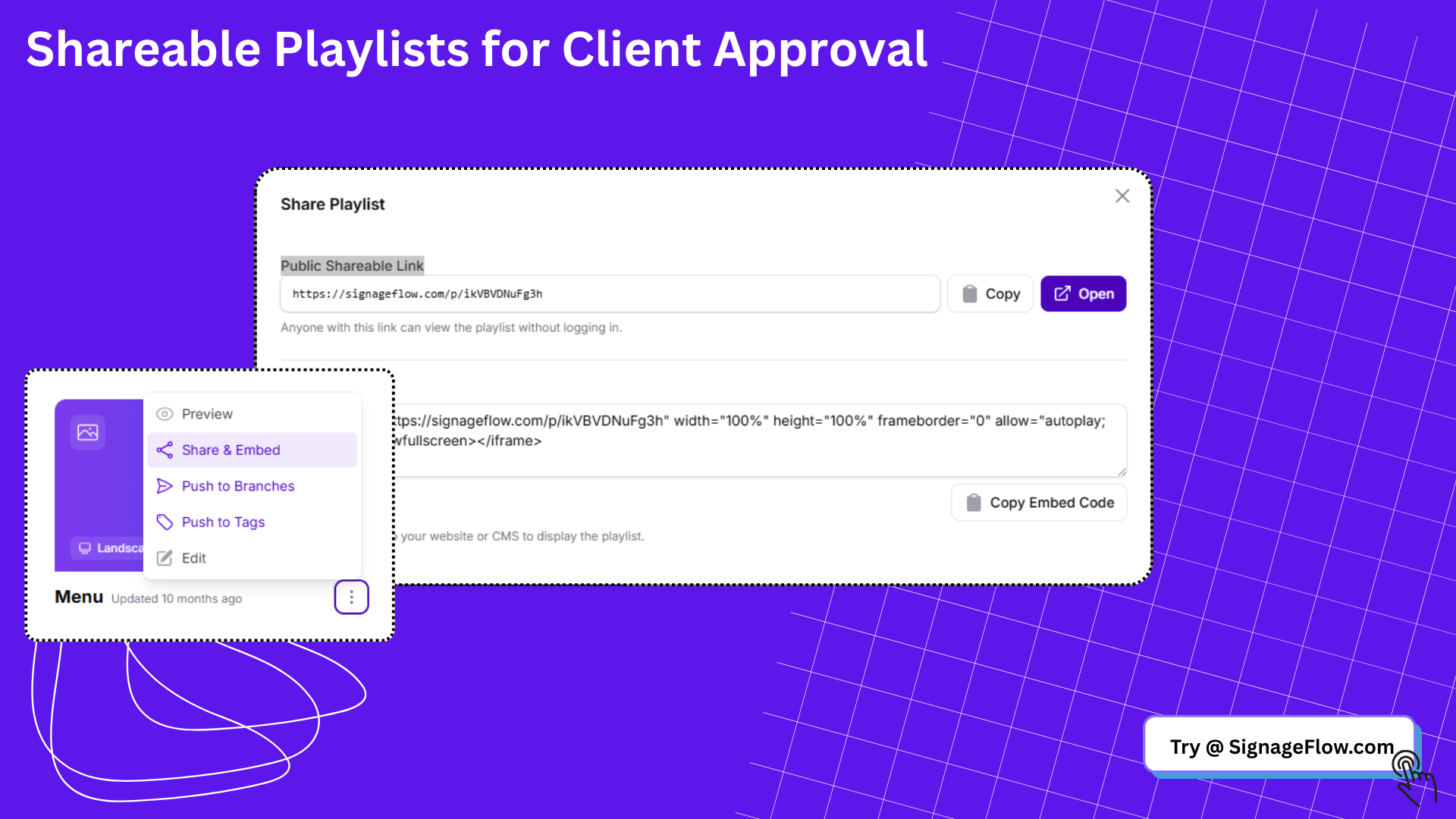
With this new feature, you can generate a public link for any playlist and share it with anyone, even if they do not have a SignageFlow account. You can also copy an embed code to place the playlist inside a website, portal, or CMS.
This means your playlists are no longer locked inside your dashboard. You can now share them where decisions happen.
Why we built Shareable Playlists
Managing screens is rarely a one-person job.
A marketing manager may need approval before launching a campaign. A franchise operator may want to preview what is going live across branches. A client may want to review signage content before it appears on screens. An internal team may want to embed a playlist into a portal or presentation.
Before Shareable Playlists, that usually meant screenshots, screen recordings, back-and-forth messages, or asking teammates to log into the platform just to preview content.
Now, you can simply share a link.
What Shareable Playlists let you do
With Shareable Playlists, you can:
Generate a public shareable link for a playlist
Let anyone with the link view the playlist without logging in
Copy an embed code to place the playlist on a website or CMS
Share signage previews faster with clients, teams, and stakeholders
Reduce delays in approvals and rollout workflows
It is a simple feature, but it solves a very real operational bottleneck.
How it works
Inside your playlist workflow, you can now open the Share & Embed option.
From there, you get two outputs:
A public shareable link
An embed code
The public link is useful when you want someone to quickly open and review a playlist in the browser.
The embed code is useful when you want to place the playlist inside another digital experience, such as a company intranet, internal dashboard, client portal, or web page.
No extra setup. No heavy handoff. Just copy and share.
Real use cases for Shareable Playlists
Here are some of the most common ways teams can use this feature.
1. Faster campaign approvals
Marketing teams often need sign-off before content goes live.
Instead of sending screenshots of each slide or asking someone to log into the dashboard, you can share a playlist link with your manager or brand team. They can review the flow, verify the content, and approve it faster.
This is especially useful for:
Seasonal campaigns
New product launches
Storewide promotions
Limited-time offers
2. Client review without extra accounts
If you manage signage for clients, Shareable Playlists make approvals much cleaner.
You can send a public link to the client so they can review exactly what will appear on screens. That keeps communication focused and removes the need to create extra user accounts just for preview access.
This is helpful for:
Agencies managing signage content
Freelancers creating playlists for local businesses
Managed signage providers
Multi-location client rollouts
3. Franchise and branch coordination
In multi-branch operations, teams often need to confirm that campaign content is ready before pushing it live everywhere.
A central team can share a playlist with regional managers, branch owners, or operations leads for a final check before rollout. That helps everyone stay aligned while keeping the publishing workflow centralized.
This is particularly useful when you need to maintain:
Brand consistency across locations
Local review before launch
Better communication between HQ and branches
4. Internal collaboration across departments
Digital signage usually touches more than one team.
HR may want to review internal announcements. Operations may want to confirm screen content in specific areas. Leadership may want visibility into what is being shown across the business.
With a shareable link, you can involve the right people without slowing your workflow down.
Good examples include:
HR reviewing employee welcome screens
Operations confirming branch messaging
Facilities teams checking lobby displays
Executive teams reviewing company-wide campaigns
5. Embedding playlists in portals or web pages
Sometimes signage content needs to live beyond the screen itself.
The embed code gives you a simple way to place a playlist into another environment, such as:
A client portal
An internal intranet
A reporting dashboard
A campaign microsite
A CMS-powered page
This can be useful for sharing live signage content with remote teams or making approved screen content visible in more places across the organization.
6. Pre-launch QA and review
Before a playlist goes live, teams often need a last round of checks.
Shareable Playlists make quality assurance easier because reviewers can open the playlist directly and inspect the sequence, content mix, and overall presentation.
That helps teams catch issues earlier, such as:
Outdated promotions
Missing media
Incorrect ordering
Formatting inconsistencies
Wrong orientation assumptions
Why this matters for signage teams
Digital signage is not just about publishing content. It is about coordinating content across people, locations, and timelines.
The more friction there is in review and approval, the slower the rollout becomes.
Shareable Playlists remove a lot of that friction.
Instead of turning playlist review into a process, you can turn it into a link.
That means:
Fewer approval bottlenecks
Less manual back-and-forth
Faster launches
Better visibility for stakeholders
Smoother collaboration across teams
Built for practical day-to-day workflows
This feature was designed for real teams doing real rollout work.
You might be managing one lobby screen or hundreds of screens across branches. Either way, the need is the same: make it easier to show people what is going live.
Shareable Playlists help you do that without introducing extra complexity.
You stay in control of the playlist. Others get a simple way to view it.
A better way to present your signage content
Sometimes the difference between a smooth workflow and a frustrating one comes down to how easily content can be shared.
Shareable Playlists give SignageFlow users a better way to present, review, and distribute playlist content across teams and stakeholders.
Whether you are collaborating with marketing, onboarding a client, reviewing a branch rollout, or embedding signage into a web experience, this feature helps you move faster with less friction.
Try Shareable Playlists today
Open any playlist in SignageFlow and use Share & Embed to generate a public link or copy the embed code.
It is one of the simplest ways to make your signage workflow more collaborative.